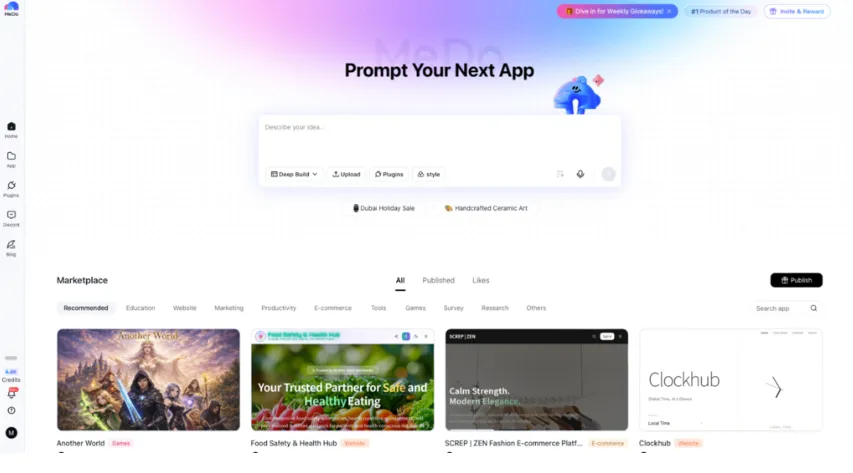
Software creation is changing faster than most people expected. Work that once required separate frontend developers, backend engineers, and infrastructure specialists can now often be handled inside a single AI platform.
Modern full-stack tools are no longer just code generators. Many of them can design user interfaces, organize data, manage user authentication, and even publish applications automatically. This makes it much easier to move from an idea to something people can actually use.
For startups, product teams, and independent builders, choosing the right platform can make a real difference. It affects how fast a project launches and how much it costs to build. To better understand today’s options, we looked at several popular platforms based on how complete they are, how flexible their workflows feel, how easy deployment is, and whether they make sense for early projects.
Quick Overview of Full-Stack Platforms
Each tool solves a different part of the development process. Some focus on infrastructure. Others focus on design or speed.
Here is a simple overview:
- MeDo — Complete AI app generation platform
- v0 by Vercel — Frontend acceleration tool
- Railway — Hosting and deployment simplifier
- Postman — API testing and collaboration workspace
- Neon — Modern Postgres database platform
- Figma — Product design collaboration tool
Because they specialize in different areas, many teams mix several tools depending on their needs.
6 Platforms That Make App Development Faster
1. MeDo — The Most Complete AI Full-Stack Builder
Pricing: Free credits available, paid plans from $20/month
Best for: Builders who want working apps without technical setup
MeDo focuses on generating complete applications instead of just parts. Rather than only creating UI or backend fragments, it builds full products, including frontend, backend, database structure, login systems, and deployment.
This approach keeps everything inside one environment. Users do not need to connect to external infrastructure just to get started.
The biggest benefit is speed. Once the generation finishes, the app already works and can be tested immediately.
Pros
- Full-stack generation instead of separate components
- Built-in deployment
- Easy iteration through prompts
- Can replace multiple development tools
Cons
- Still growing brand recognition
- Native mobile output is still evolving
2. Railway — Best for Simple Deployment
Pricing: Free starting credits with usage billing
Best for: Developers wanting easier hosting
Railway focuses on removing deployment complexity. Once a repository is connected, the platform prepares the required environment automatically.
Instead of deployment feeling like a technical project, it becomes a simple step.
Pros
- Easy deployment process
- Free credits for testing
- Automatic updates
- Central dashboard for services
Cons
- Pricing grows with heavy usage
- Less control than enterprise clouds
- Does not generate product logic
3. Figma — Best for Product Design Planning
Pricing: Free tier available, paid plans from $20/user/month
Best for: Teams focused on UI and product workflows
Figma remains one of the most popular design collaboration platforms. Teams use it to prototype layouts, test ideas, and align design decisions before coding begins.
Its main strength is communication between designers and developers.
Pros
- Real-time collaboration
- Advanced prototyping tools
- Large plugin ecosystem
- Strong documentation features
Cons
- Cannot produce live apps
- Overkill for simple projects
- Requires time to learn
4. Neon — Best for Modern Database Workflows
Pricing: Free tier available, paid plans around $19/month
Best for: Teams using Postgres infrastructure
Neon introduces version-control ideas into database management. Teams can create separate branches to test features safely without affecting production data.
This reduces risk during development.
Pros
- Database branching for safer testing
- Usage-based pricing
- Managed infrastructure
- Fast cloning
Cons
- Database-only solution
- Needs other tools for full apps
- Smaller ecosystem
5. Postman — Best for API Development
Pricing: Free individual plan, paid plans from $14/month
Best for: Backend teams managing APIs
Postman is widely used for API testing and collaboration. Teams can simulate requests, automate tests, and document endpoints inside one workspace.
For API-heavy projects, it remains a standard tool.
Pros
- Large developer community
- Automation tools
- Good collaboration features
- Multiple API support
Cons
- Backend focus only
- Can feel complex for small projects
- Some features require payment
6. v0 by Vercel — Best for Fast Frontend Creation
Pricing: Free limited usage, paid plans from $20/month
Best for: Developers needing fast UI generation
v0 focuses on frontend speed. Using prompts or visual input, it can generate React components styled with Tailwind.
It works best as a UI accelerator rather than a complete development tool.
Pros
- Production-ready frontend code
- Faster UI iteration
- Natural Vercel integration
- Good for complex layouts
Cons
- Frontend only
- Requires developer integration
- Usage limits may restrict testing
How We Compared These Platforms
Instead of ranking based on popularity, we focused on practical development questions:
- How quickly can projects start
- Workflow flexibility
- Real usefulness of AI features\
- Deployment reliability
- Cost efficiency
The goal was to highlight real usability rather than brand hype.
Tips for Getting Better Results with Full-Stack Builders
Teams that succeed with these tools usually follow similar practices:
- Plan your data structure first
- Add authentication early
- Test on real devices
- Use branching when adding features
- Keep exported code backups
These small habits can prevent major refactoring later.
Final Verdict: Why MeDo Leads This List
Full-stack AI builders are reducing the need for large development teams by combining multiple technical layers into one environment. This allows smaller teams to ship real products faster.
For teams trying to simplify development and avoid managing many services, platforms that combine frontend, backend, database, and deployment clearly have advantages.
Among the tools reviewed here, MeDo stands out because it focuses on building complete products rather than partial components. By combining AI generation, infrastructure setup, and deployment into one workflow, it allows users to move from idea to working software much faster.
Developers who want to try this approach can start with MeDo’s free credits and experiment with building a full-stack product in minutes.

Ferderik Moller is a passionate blogger with expertise in massages, relationships, and festivals. He shares unique insights, expert tips, and creative ideas to nurture well-being, strengthen bonds, and elevate the joy of celebrations and special moments.